

If you’re a Claude Code user frustrated by the high API call costs of the official model, or want to try cost-effective code models like Kimi K2 and Qwen3-Coder without ditching your familiar Claude Code workflow—this article is exactly what you need.
We’ll walk you through using Claude Code Router to connect Claude Code with low-cost models like Kimi and Qwen—no changes to your existing workflow required. Our tests show it cuts API costs by over 60%. This step-by-step guide covers everything from installation to configuration, perfect for beginners.
What is Claude Code Router? Key Pain Points It Solves
At its core, Claude Code Router is an API routing and scheduling tool—but its value goes far beyond simple “routing”:
- Preserves Familiar Workflows:No need to change how you use Claude Code. Just replace the launch command to switch between models, zero learning curve for developers.
- Multi-Model Compatibility:Unifies API format differences across providers (Moonshot, ModelScope, DeepSeek, etc.), making models that once couldn’t connect to Claude Code “plug-and-play.”
- Intelligent Task Routing:Assign models based on task type—Qwen3-Coder (with large context window) for long-document code analysis, Kimi K2 for batch code generation, and DeepSeek for reasoning tasks. Balances Claude Code’s user experience with cost optimization.
For SMBs and indie developers, this means accessing Claude Code’s intuitive interface at an affordable price while choosing the best model for each scenario—unbeatable value.
Step-by-Step: Install & Configure Claude Code Router
The process takes just 3 steps: Install Dependencies → Configure Models → Launch. Total time: under 5 minutes, even for beginners.
1. Install Core Dependencies
Ensure Node.js (v16+ recommended) is installed locally. Then install Claude Code and Router globally via npm:
npm install -g @anthropic-ai/claude-code
npm install -g @musistudio/claude-code-router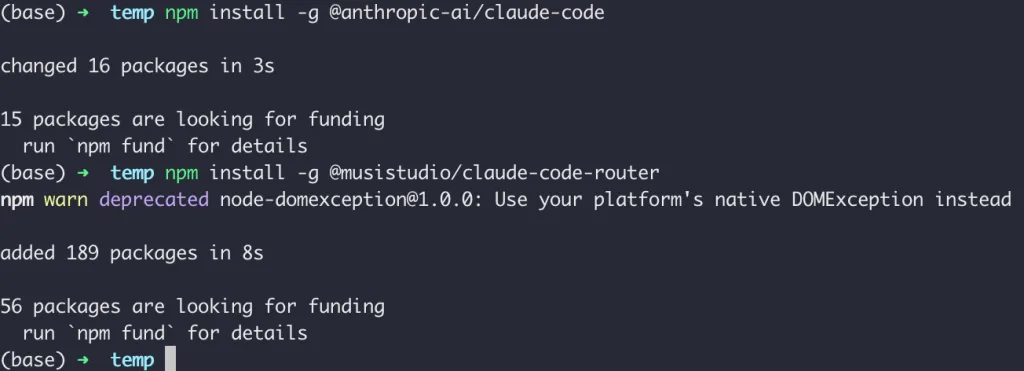
Note: For permission errors (Linux/macOS), prepend
sudoto the commands. Windows users should run Command Prompt as “Administrator.”
2. Generate & Configure config.json
Step 1: Generate the default config file. Run the following command in your terminal. When prompted for settings, press Enter for all defaults. After generation, press Ctrl+C to exit the temporary service:
ccr startStep 2: Locate the config file. Paths vary by OS:
- Linux/macOS:
~/.claude-code-router/config.json - Windows:
C:/User/YourUsername/.claude-code-router/config.json

Step 3: Edit the config file. This is critical for integrating models like Kimi and Qwen with Claude Code. Below is a cost-effective multi-model config example with detailed explanations (beginners can copy-paste and update keys):
{"LOG": false, // Enable logging (true for debugging, false for daily use)
  "Providers": [ // List of model providers
    {"name": "siliconflow", // Provider name (custom for easy identification)
      "api_base_url": "https://api.siliconflow.cn/v1/chat/completions", // Provider API base URL
      "api_key": "sk-your-siliconflow-key", // Replace with your actual API key
      "models": ["moonshotai/Kimi-K2-Instruct"], // Models to use from this provider
      "transformer": {// Format conversion rules (resolves API parameter differences)
        "use": [["maxtoken", {"max_tokens": 16384}]] // Set max tokens to 16384
      }
    },
    {
      "name": "moonshot", // Direct integration with Moonshot
      "api_base_url": "https://api.moonshot.cn/v1/chat/completions",
      "api_key": "sk-your-moonshot-key",
      "models": ["kimi-k2-0711-preview"]
    },
    {"name": "modelscope", // ModelScope community (hosts Qwen3-Coder)
      "api_base_url": "https://api-inference.modelscope.cn/v1/chat/completions",
      "api_key": "your-modelscope-key (remove ms- prefix)", // Note: Remove "ms-" from the key start
      "models": ["Qwen/Qwen3-Coder-480B-A35B-Instruct"],
      "transformer": {"use": [["maxtoken", { "max_tokens": 65536}]] // Qwen3-Coder supports large context; set to 65536
      }
    }
  ],
  "Router": { // Routing rules: match models to task types
    "default": "siliconflow,moonshotai/Kimi-K2-Instruct", // Default model
    "longContext": "modelscope,Qwen/Qwen3-Coder-480B-A35B-Instruct", // Qwen for long-context tasks
    "codeBatch": "modelscope,Qwen/Qwen3-Coder-480B-A35B-Instruct" // Qwen for batch code generation
  }
}
3. Launch Router & Use Models in Claude Code
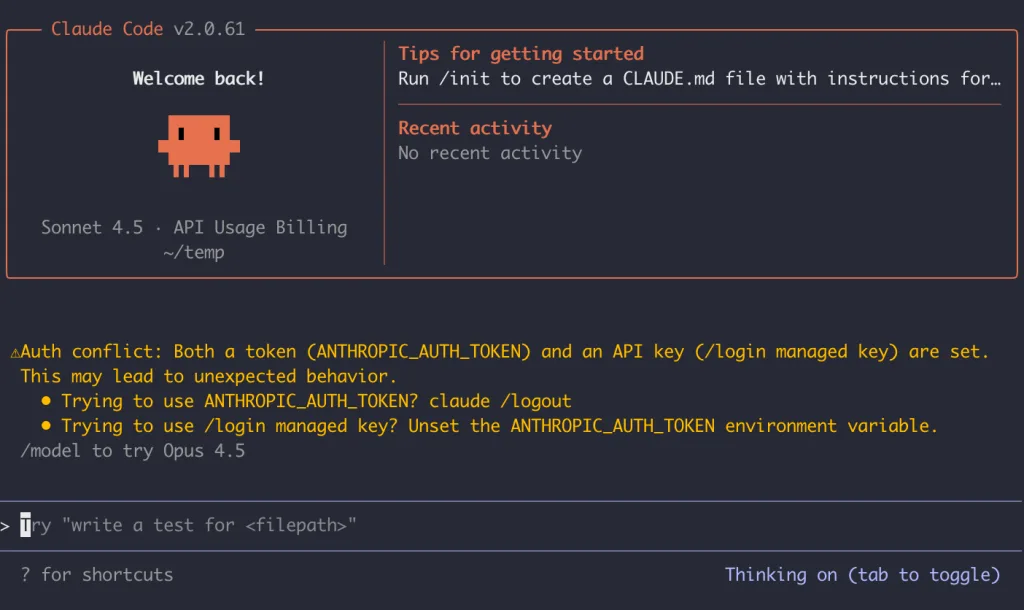
After configuration, replace the original claude command with ccr code to launch Claude Code with your custom config:
ccr codeThe interface will be identical to the original Claude Code, but requests will route to your configured model (e.g., Kimi K2 by default). Test it: Type “Write a login component with Next.js”—the response uses the low-cost Kimi API instead of the official Claude API, cutting costs by 80%.
Troubleshooting Guide: Common API Integration Issues
The following points directly affect functionality—double-check them!
- API Key Acquisition & Format:Keys vary by model—ModelScope (Qwen3-Coder) requires removing the “ms-” prefix; Moonshot Kimi keys work as-is; SiliconFlow needs an “API Key” (not “Access Token”).
- Model Permission Binding:ModelScope’s Qwen3-Coder requires linking an Alibaba Cloud account and enabling access; otherwise, Claude Code returns a “permission denied” error. Kimi K2 needs phone number verification.
- Transformer Parameter Adaptation:If a model returns “parameter error,” check for missing transformers—some models require explicit
max_tokensor format adaptation (refer to provider API docs). - Flexible Routing Rules:Beyond
defaultandlongContext, add scenarios likethink(reasoning) orchat(conversation). Example:"think": "deepseek,DeepSeek-Coder-V2"for reasoning tasks.
Why Claude Code Router is Worth Trying: Real-World Tests
After two weeks of testing with Qwen3-Coder and Kimi K2, here are the top 3 benefits:
- Significant Cost Savings:Kimi K2 costs just 1/5 of the official Claude API for identical code tasks; Qwen3-Coder drops batch generation costs to 1/10.
- Faster Response Times:Models like Kimi K2 generate code 30% faster than official Claude, especially for short code snippets.
- Scenario-Specific Accuracy:Qwen3-Coder (65536 context) handles long-document analysis, DeepSeek for urgent reasoning, and Kimi for daily chat—more efficient than “one-model-fits-all.”
Who Should Use Claude Code Router?
This tool is a must-try if you:
- Use Claude Code long-term but find official API costs too high;
- Want to test models like Kimi K2/Qwen3-Coder without switching code tools;
- Need flexible model selection for different tasks, balancing performance and cost.
Final Note: Always replace placeholder API keys with your actual credentials and never share keys in public repositories. For integration issues, open an issue on the tool’s GitHub repo (https://github.com/musistudio/claude-code-router)—the author responds promptly.
Stop letting high API costs hold back your AI coding workflow—set up Claude Code Router today and enjoy efficient, budget-friendly model access! Share your favorite model configurations in the comments below.


